
Characters
Every character on your server with their money, job and vehicles, and how staff give items, set money, change jobs, edit details and set character slots.
On this page
Open Characters in the sidebar to see every character on your server, read from your game database.
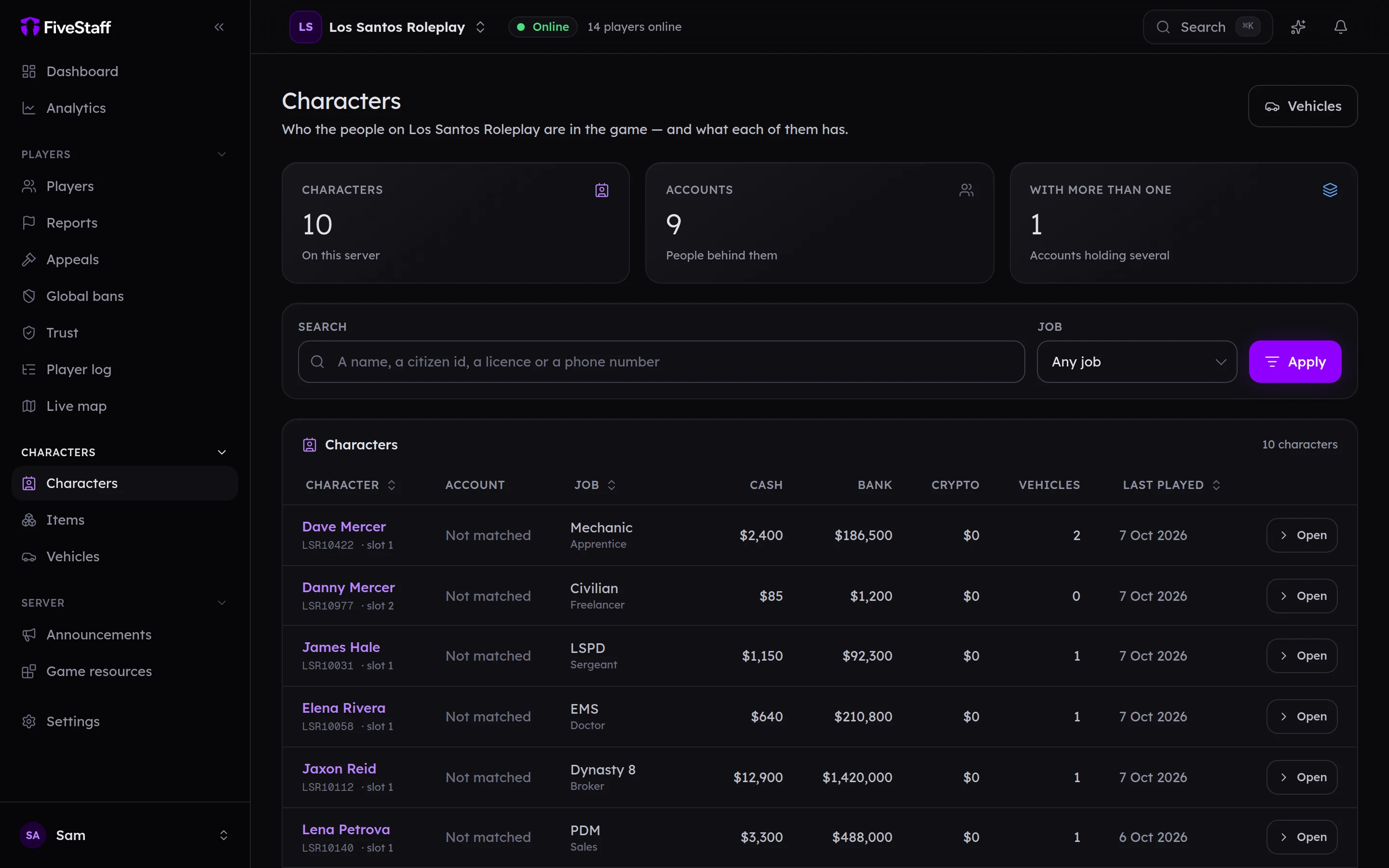
- Search by name, citizen ID, licence or phone number, and filter by job.
- The cards at the top count characters, the accounts behind them and how many accounts have more than one character.
- Not matched means FiveStaff has not seen that character's player join since it was installed. The character can be viewed but not edited until they have.
One character#
Press Open on any character.
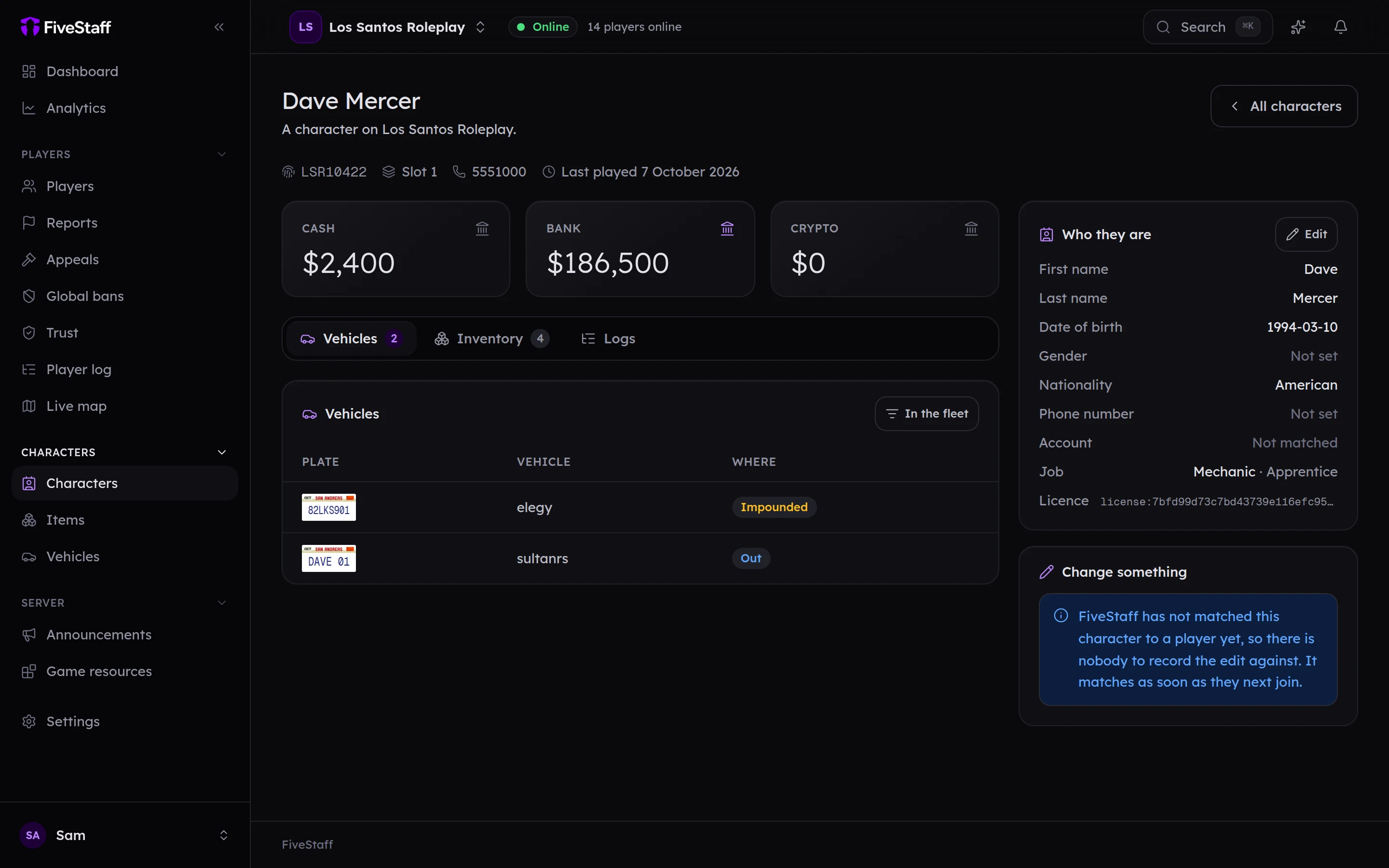
- The cards along the top show each money account.
- Vehicles, Inventory and Logs tabs show what they own, what they carry and what they have done.
- Who they are shows their name, date of birth, nationality, phone number and job.
- Open the account goes to the player's profile, where all their characters are listed on the Characters tab.
- Open their phone shows their in-game phone records, on servers running LB Phone, for staff allowed to see them.
Making changes#
The Change something card makes an edit:
- Set an item count
- Set a balance
- Give a vehicle or Remove a vehicle
- Set the job
The Inventory tab also has Give an item and buttons on each item to add, take away or remove it.
These edits are carried out by your game server, so it must be online. Each one is written to the audit log with what it was before. To undo one, open the player's profile, go to Framework → Edits and press Revert.
Editing who they are#
Edit on the Who they are card changes the character's name, date of birth, gender, nationality and phone number. The character must not be in game at the time. This change is written straight to your database and cannot be reverted with one press, so check it before you save.
On an HFX server the change is made by HFX itself, through your game server, so it works while the character is in game and the game server must be online. HFX checks the new details with the same rules as a new character, and turns down a phone number another character already has. ID cards and bank cards HFX has already issued keep the old details, as real ones would.
Character slots#
Character slots are how many characters a player can have. Staff change them from the player's profile.
- Open the player's profile and go to the Characters tab.
- Press Adjust slots. The line beside it shows how many they use, such as 2 of 3 slots used.
- Choose the number of slots, and add a reason if you like, such as "Bought an extra slot".
- Save. It takes effect the next time they see the character screen.
The player does not need to be online, but your game server does. The change is written to the audit log with the number before and after. On the phone app it is the same: open the player, then Characters, then Adjust slots. The in-game panel opens the same profile.
You can choose from 1 to 10 slots. On most servers you cannot go below the number of characters the player already has, because there is no telling what their character screen would do with the extra ones. On esx_multicharacter you can, as it keeps the extra characters and only shows the first ones.
Which character screens work#
Slots are changed through your server's character selection script, so it depends which one you run:
| Script | Adjust slots |
|---|---|
| esx_multicharacter | Yes, and the panel shows how many slots they have now |
| op-multicharacter | Yes, but the panel cannot show how many they have now. Its own documentation says this only works while its Discord Ranks option is off |
| qb-multicharacter, ps-multicharacter, Qbox's own character screen | No. They set slots per player in their config files, which only you can edit |
| 0R Multicharacter, okokMulticharacter, codem-multicharacter, 17mov Character System, um-multicharacter, wais-multicharacterv2 | No. They give other scripts no way to set a player's slots |
On a server where it cannot work, Adjust slots is not shown at all, and your server console says which script was found and why when FiveStaff starts.
Another character screen#
If your script's author gives you a server export or event that sets a player's slots, you can tell FiveStaff to use it. Add one line to your server.cfg and restart the server:
set fivestaff_multicharacter_slots "export their_script SetSlots {license} {slots}"
- Start it with
exportand the script's name and export, orserverEventand the event's name. {slots}is replaced with the number.{license}is the player's licence withlicense:in front, and{licenseBare}is the same without it. Put them in the order the export or event expects.
To stop FiveStaff changing slots at all, set fivestaff_multicharacter to none.
Permissions#
Viewing needs View framework data. Each kind of edit has its own permission: Edit inventories, Edit money, Edit vehicles, Edit jobs and Edit character details. Undoing needs Revert framework edits. Changing character slots needs Change how many characters a player can have, which roles allowed to edit character details have from the start.
Bank and property on HFX#
On an HFX server a character's page has two more sections.
- Bank shows every account they own or share, each account's statement, their cards, their credit score and its history, their loans and their bills. From here staff can freeze an account, move money in or out of a savings, joint or business account, add or remove a joint account member, block or unblock a card, and cancel a bill or mark it paid.
- Property shows the homes they own and rent, the keys they hold and the keys others hold to their homes, rent, mortgages, charges and storage lockers. From here staff can hand a home to another character or back to the agency, end a tenancy, set the rent, give or take keys, change the locks, lock or unlock, waive a charge and release a storage locker.
Changing what a character owes (a loan, their credit score or a mortgage) needs its own permission, Change, cure or forgive loans, set credit scores, settle or change mortgages, so you can let staff cancel a mistaken bill without letting them write off a debt. Each section also needs its own permission to see, and every look is written to the audit log.
None of these changes costs the character money or credit. Most can be undone from the audit log; the panel tells you when one cannot, such as a forgiven loan.
The economy pages also gain Properties, every home on the server with its owner, tenant and arrears, and Owed, loans that are late or in default and bills that are overdue.